
-
- WoooCommerce Plugin
- 08 June 2026
- 8 Mins read

WooCommerce Instant Product Preview: Improve User Experience and Boost Sales
In the highly competitive world of eCommerce, every click matters. Customers expect fast, seamless shopping experiences that help them find products quickly without unnecessary page loads or interruptions. If your WooCommerce store forces visitors to open multiple product pages just to view basic details, you may be losing potential sales.
This is where WooCommerce Instant Product Preview becomes a valuable solution.
An instant product preview allows customers to view product information inside a popup window directly from shop, category, and archive pages. Instead of navigating away from product listings, shoppers can quickly inspect products, review details, select variations, and add items to their cart.
For WooCommerce store owners looking to improve user experience and increase conversions, Storzen Quick View for WooCommerce offers a simple and effective way to implement instant product previews.
In this guide, we’ll explore how WooCommerce Instant Product Preview works, its benefits, practical use cases, and why it can significantly improve your online store’s performance.
What Is WooCommerce Instant Product Preview?
WooCommerce Instant Product Preview is a feature that allows shoppers to view essential product information through a popup modal without leaving the current page.
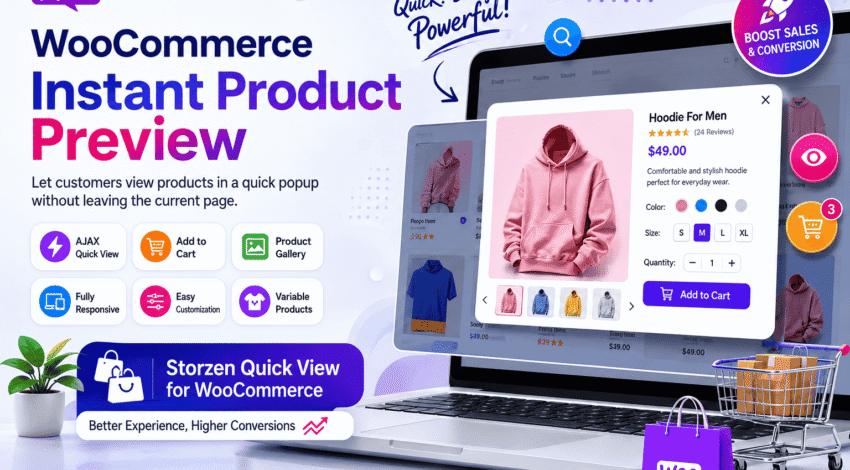
When a customer clicks a “Quick View” button, a popup appears displaying:
- Product images
- Product title
- Price
- Short description
- Product variations
- Quantity selector
- Add to Cart button
- Product gallery
The customer can review product information and add items to the cart instantly, reducing the number of steps required to complete a purchase.
Instead of navigating through multiple product pages, shoppers can browse products more efficiently and make faster buying decisions.
Why Instant Product Preview Matters for WooCommerce Stores
Modern online shoppers value speed and convenience.
Every additional page load creates friction in the buying process. If customers must repeatedly leave category pages to inspect products, many will abandon their shopping journey.
Instant product previews help solve this problem by creating a smoother browsing experience.
Key Benefits
- Faster product discovery
- Reduced page navigation
- Improved user experience
- Higher customer engagement
- Increased add-to-cart rates
- Lower bounce rates
- Better mobile shopping experience
For stores with large product catalogs, quick previews can dramatically improve browsing efficiency.
Introducing Storzen Quick View for WooCommerce
Storzen Quick View for WooCommerce is a lightweight plugin designed to provide instant product previews directly within your WooCommerce store.
Plugin Page:
https://wordpress.org/plugins/storzen-quick-view-for-woocommerce/
The plugin enables customers to view product details inside an attractive popup modal without leaving the current page.
Whether you’re running a fashion store, electronics shop, baby products business, or furniture marketplace, the plugin helps customers explore products faster and with less friction.
Core Features of Storzen Quick View for WooCommerce
Instant Product Popup
Customers can open a detailed product preview directly from:
- Shop pages
- Category pages
- Product archives
- Related product sections
This eliminates unnecessary page loads and keeps shoppers focused on browsing.
AJAX-Powered Performance
The plugin loads product information dynamically using AJAX.
Benefits include:
- Faster loading
- Smoother experience
- Reduced waiting time
- Improved usability
Product Gallery Support
Customers can view multiple product images inside the popup.
This is especially useful for stores selling:
- Fashion products
- Baby products
- Electronics
- Home décor
- Furniture
Multiple images help customers make more informed buying decisions.
Variable Product Support
Many WooCommerce stores sell products with options such as:
- Size
- Color
- Material
- Style
Storzen Quick View allows customers to select available variations directly inside the popup.
Add to Cart Without Leaving the Page
One of the most powerful conversion features is the ability to add products to the cart directly from the preview modal.
Customers can:
- Select variations
- Choose quantity
- Add to cart
All without opening the product page.
Responsive Design
The popup works smoothly across:
- Desktop devices
- Tablets
- Smartphones
This ensures a consistent shopping experience for mobile users.
Easy Customization
Store owners can customize the quick view experience to match their branding and store design.
The feature integrates naturally into most WooCommerce themes.
How WooCommerce Instant Product Preview Improves Conversions
Conversion optimization is about removing barriers between product discovery and purchase.
Instant product previews help achieve this in several ways.
Faster Decision Making
Customers can compare multiple products quickly.
Instead of opening ten separate product pages, they can preview products directly from category pages.
This speeds up the decision-making process.
Reduced Friction
Every click introduces potential abandonment.
Quick view popups reduce unnecessary navigation and streamline the customer journey.
Better Product Visibility
Many customers browse product grids quickly.
A prominent Quick View button encourages deeper engagement with products that might otherwise be overlooked.
Increased Add-to-Cart Actions
By placing product details and add-to-cart functionality in a popup, customers can purchase products immediately after viewing them.
This often leads to higher conversion rates.
Real-World Use Cases
Fashion Stores
Fashion shoppers frequently compare:
- Colors
- Sizes
- Styles
Quick View allows them to inspect products and select variations instantly.
Baby Product Stores
Parents often browse multiple products before purchasing.
Instant previews make it easier to review:
- Baby clothing
- Toys
- Feeding accessories
- Nursery items
Without repeatedly opening product pages.
Electronics Stores
Technical products usually require quick access to:
- Specifications
- Images
- Pricing
Quick view popups allow customers to compare products efficiently.
Furniture Stores
Furniture shoppers often evaluate multiple items before making a decision.
Instant previews provide quick access to product information while maintaining browsing momentum.
Beauty and Cosmetics Stores
Customers can quickly review:
- Product images
- Descriptions
- Variants
And add products directly to their cart.
WooCommerce Instant Product Preview vs Traditional Product Pages
Traditional Product Pages
Pros:
- Full product information
- Detailed specifications
- SEO-friendly content
Cons:
- More page loads
- Slower browsing experience
- Increased navigation friction
Instant Product Preview
Pros:
- Faster browsing
- Better user experience
- Higher engagement
- Reduced interruptions
Cons:
- Less space for extensive product details
Best Approach
The most effective strategy is combining both.
Use Quick View for fast browsing and keep detailed product pages available for customers who want more information.
This provides flexibility and convenience.
SEO Benefits of Improved User Experience
While Quick View itself is not a direct ranking factor, it can contribute to positive user engagement signals.
Potential benefits include:
Lower Bounce Rates
Customers remain engaged with product listings instead of leaving the site.
Increased Session Duration
Shoppers often explore more products when browsing becomes easier.
More Page Interactions
Quick previews encourage users to interact with multiple products.
Improved Mobile Experience
A better mobile experience can positively impact customer satisfaction and engagement.
Together, these factors can contribute to stronger overall site performance.
Best Practices for Using WooCommerce Instant Product Preview
Place Quick View Buttons Prominently
Ensure buttons are visible on:
- Product grids
- Category pages
- Featured product sections
Use High-Quality Product Images
Images are often the first thing customers evaluate.
High-quality visuals improve engagement.
Include Essential Product Information
Display:
- Product title
- Price
- Key features
- Variations
- Add-to-cart functionality
Optimize for Mobile Devices
Many WooCommerce stores receive significant mobile traffic.
Ensure popup layouts remain user-friendly on smaller screens.
Monitor Conversion Metrics
Track:
- Add-to-cart rates
- Product engagement
- Bounce rates
- Conversion rates
To measure the impact of your quick view implementation.
Why Store Owners Choose Storzen Quick View for WooCommerce
Store owners often choose Storzen Quick View because it offers:
- Simple setup
- Lightweight performance
- AJAX-powered loading
- Variable product support
- Mobile responsiveness
- Improved shopping experience
- Better conversion opportunities
The plugin focuses on enhancing the customer journey without adding unnecessary complexity.
Frequently Asked Questions
1. What is WooCommerce Instant Product Preview?
WooCommerce Instant Product Preview allows customers to view product details in a popup modal without opening the full product page.
2. Does Storzen Quick View support variable products?
Yes. Customers can select available variations such as size and color directly inside the quick view popup.
3. Will Quick View slow down my WooCommerce store?
No. Storzen Quick View uses AJAX technology to load product information efficiently, helping maintain fast performance.
4. Is the plugin mobile-friendly?
Yes. The popup interface is fully responsive and works across desktops, tablets, and smartphones.
5. Can customers add products to the cart from the popup?
Yes. Customers can select options, adjust quantities, and add products directly to the cart without leaving the current page.
Conclusion
A fast and frictionless shopping experience is essential for modern WooCommerce stores. Customers want quick access to product information without repeatedly loading new pages.
WooCommerce Instant Product Preview helps achieve exactly that.
By allowing shoppers to view products, select variations, and add items to the cart directly from a popup, store owners can reduce friction, improve engagement, and potentially increase conversions.
If you’re looking for an effective way to enhance product discovery and streamline the buying journey, Storzen Quick View for WooCommerce is an excellent solution worth considering. Its lightweight architecture, AJAX-powered previews, and user-friendly customization options make it a valuable addition to any WooCommerce store.
Recommended Action Steps
- Install Storzen Quick View for WooCommerce.
- Enable Quick View on shop and category pages.
- Test the popup experience on mobile devices.
- Monitor add-to-cart and conversion metrics.
- Continuously optimize product images and descriptions.
A better browsing experience often leads to happier customers—and happier customers are more likely to buy.