
-
- WoooCommerce Plugin
- 09 June 2026
- 8 Mins read

Multi Currency Switcher for WooCommerce: The Complete Guide to Global Selling
Running an online store is no longer limited to local customers. Thanks to eCommerce and digital payments, businesses can sell products worldwide with just a few clicks. However, one challenge remains common among international WooCommerce stores: currency conversion and localization.
When shoppers visit your website from different countries, they naturally prefer to see prices in their own currency. Displaying prices only in your store’s base currency can create confusion, reduce trust, and even lead to abandoned carts.
This is where Multi Currency Switcher for WooCommerce becomes an essential tool.
Whether you’re selling digital products, fashion items, electronics, handmade goods, or subscription services, a reliable currency switcher can significantly improve the shopping experience and help increase conversions.
In this guide, we’ll explore how a WooCommerce multi-currency plugin works, its benefits, features, use cases, and why it can be a valuable addition to your online store.
Why Multi-Currency Support Matters in WooCommerce
The global eCommerce market continues to expand, and customers expect localized shopping experiences.
Imagine a customer from Canada visiting your store and seeing all prices displayed in USD. They may need to calculate the conversion manually before making a purchase. The same situation applies to shoppers from Europe, Australia, Japan, or the United Kingdom.
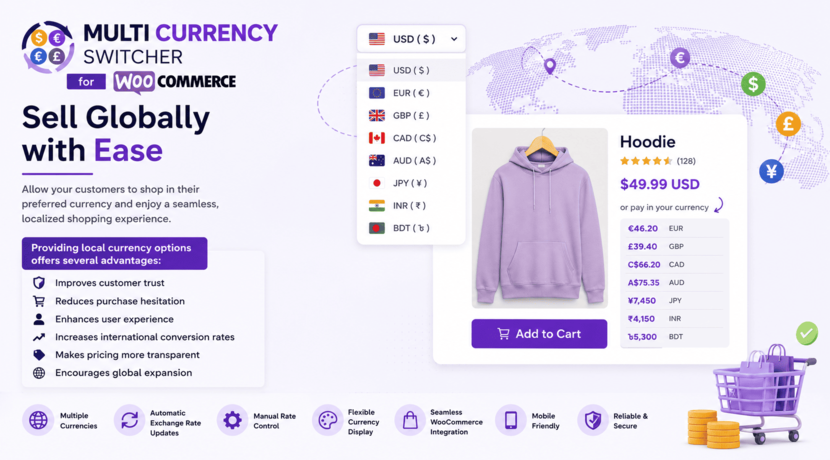
Providing local currency options offers several advantages:
- Improves customer trust
- Reduces purchase hesitation
- Enhances user experience
- Increases international conversion rates
- Makes pricing more transparent
- Encourages global expansion
Customers feel more comfortable purchasing when they instantly understand the product price without performing calculations themselves.
What Is Multi Currency Switcher for WooCommerce?
Multi Currency Switcher for WooCommerce is a WooCommerce extension that allows store owners to display products in multiple currencies.
Visitors can easily switch between supported currencies using a currency selector, allowing them to browse prices in the currency they are most familiar with.
The plugin helps create a localized shopping experience without requiring separate stores for different regions.
Whether your audience is spread across North America, Europe, Asia, or Australia, a multi-currency solution helps ensure a seamless buying experience.
Key Features of Multi Currency Switcher for WooCommerce
Multiple Currency Support
Add and manage multiple currencies within your WooCommerce store.
Popular currencies often include:
- US Dollar (USD)
- Euro (EUR)
- British Pound (GBP)
- Canadian Dollar (CAD)
- Australian Dollar (AUD)
- Japanese Yen (JPY)
- Bangladeshi Taka (BDT)
- Indian Rupee (INR)
This flexibility allows businesses to target customers worldwide.
User-Friendly Currency Switcher
Customers can quickly change currencies using a convenient switcher displayed on the website.
This makes browsing products easier and improves transparency throughout the purchasing process.
Automatic Exchange Rate Updates
Managing exchange rates manually can be time-consuming.
Automatic exchange rate updates help keep product prices accurate and aligned with current market values.
Benefits include:
- Reduced maintenance
- Accurate pricing
- Better customer confidence
- Consistent international pricing
Manual Exchange Rate Control
Some businesses prefer custom pricing strategies rather than real-time exchange rates.
Manual exchange rate settings provide complete control over how prices are displayed across currencies.
This is useful for:
- Stable pricing
- Region-specific pricing strategies
- Marketing campaigns
- Profit margin protection
Flexible Currency Display
Store owners can customize how currencies appear on the storefront.
Options typically include:
- Currency symbols
- Symbol position
- Decimal settings
- Thousand separators
- Price formatting
This ensures pricing matches local customer expectations.
WooCommerce Compatibility
The plugin integrates directly with WooCommerce and works alongside standard store functionality.
Customers can:
- Browse products
- View converted prices
- Add items to cart
- Complete checkout processes
without disrupting their shopping journey.
Benefits of Using a WooCommerce Currency Switcher
Improve International Customer Experience
Localization plays a major role in eCommerce success.
When visitors see familiar currency symbols and pricing formats, they are more likely to engage with products and complete purchases.
Increase Conversion Rates
One of the biggest reasons shoppers abandon carts is uncertainty about final costs.
Displaying prices in local currencies helps eliminate confusion and creates confidence during checkout.
Expand into New Markets
A currency switcher allows businesses to enter international markets without launching separate WooCommerce stores.
This reduces operational complexity while serving global audiences effectively.
Build Trust and Transparency
Transparent pricing helps customers understand exactly what they are paying.
This can reduce support inquiries and improve overall customer satisfaction.
Gain Competitive Advantage
Many small and medium-sized stores still operate with a single currency.
Offering multi-currency support can help your store stand out and provide a more professional shopping experience.
Real-World Use Cases
International Fashion Store
A clothing brand sells products to customers in:
- United States
- United Kingdom
- Germany
- Australia
Using a currency switcher allows customers from each region to view prices in their preferred currency, improving shopping convenience.
Digital Product Marketplace
A software company sells plugins, themes, and digital tools worldwide.
Displaying localized prices helps customers understand product costs instantly and improves purchasing confidence.
Handmade Product Business
A small artisan business ships products internationally.
Multi-currency support helps attract buyers from different countries while maintaining a professional storefront.
Electronics Store
Electronics often involve higher-value purchases.
Displaying accurate local pricing helps reduce hesitation and increases the likelihood of conversion.
Subscription-Based Services
Businesses selling memberships or recurring subscriptions can benefit from currency localization by making pricing easier to understand for international users.
How Multi Currency Switcher Improves SEO
While a currency switcher is primarily designed to improve user experience, it can indirectly support SEO efforts.
Lower Bounce Rates
Visitors are more likely to stay on a website when pricing is easy to understand.
Lower bounce rates often signal better user engagement.
Better User Experience Signals
Google increasingly values positive user experiences.
Localized pricing contributes to:
- Increased time on site
- Higher engagement
- Improved conversion paths
Global Audience Reach
A multi-currency store is naturally more appealing to international visitors arriving through organic search.
This broadens your market reach and potential customer base.
Enhanced Brand Credibility
Professional localization creates trust and encourages visitors to explore additional products and categories.
Multi Currency Switcher vs Single Currency WooCommerce Stores
| Feature | Multi Currency Store | Single Currency Store |
| International Friendliness | Excellent | Limited |
| Customer Convenience | High | Moderate |
| Price Transparency | High | Lower |
| Global Sales Potential | Strong | Restricted |
| Conversion Rates | Higher Potential | Lower Potential |
| Localization Experience | Excellent | Basic |
For stores targeting international audiences, multi-currency functionality offers a significant advantage.
Best Practices for Multi-Currency WooCommerce Stores
Support Popular Global Currencies
Focus on currencies used by your target audience.
Research customer locations using analytics data before adding currencies.
Keep Exchange Rates Updated
Accurate rates prevent pricing inconsistencies and improve trust.
Test the Shopping Experience
Review the entire purchasing journey:
- Product pages
- Cart page
- Checkout page
- Order confirmation
Ensure pricing remains consistent across currencies.
Monitor International Sales
Track which currencies generate the most revenue.
This data can help guide marketing and expansion decisions.
Maintain Clear Pricing
Avoid overly complicated pricing structures that may confuse customers.
Consistency improves usability and customer confidence.
Who Should Use Multi Currency Switcher for WooCommerce?
This plugin is ideal for:
eCommerce Businesses
Stores selling products internationally can provide a better shopping experience.
Digital Product Sellers
Software, courses, memberships, and downloadable products often attract global audiences.
Dropshipping Stores
Dropshipping businesses frequently serve customers across multiple countries.
Subscription Services
Membership and recurring billing businesses benefit from localized pricing.
Growing Brands
Companies expanding internationally can support global customers without creating separate stores.
Frequently Asked Questions
1. What is a WooCommerce multi-currency plugin?
A WooCommerce multi-currency plugin allows customers to view product prices in different currencies instead of the store’s default currency.
2. Does a currency switcher improve conversions?
Yes. Customers generally feel more comfortable purchasing when prices are displayed in their local currency, which can increase conversion rates.
3. Can I manually set exchange rates?
Yes. Many multi-currency solutions provide manual exchange rate controls for custom pricing strategies.
4. Is multi-currency support useful for small stores?
Absolutely. Even small businesses can attract international customers and improve the shopping experience with localized pricing.
5. Does the plugin work with WooCommerce products?
Yes. The plugin is designed specifically for WooCommerce and integrates with standard store functionality.
Conclusion
As online shopping becomes increasingly global, providing localized experiences is no longer optional for many WooCommerce stores.
Multi Currency Switcher for WooCommerce helps businesses display prices in multiple currencies, improve customer confidence, and create a smoother purchasing journey for international shoppers.
Whether you’re selling physical products, digital downloads, subscriptions, or services, a currency switcher can help remove barriers that prevent customers from completing purchases.
Recommended Action Steps
- Install Multi Currency Switcher for WooCommerce.
- Add currencies relevant to your target markets.
- Configure exchange rates and display settings.
- Test the complete checkout experience.
- Monitor international sales performance and optimize accordingly.
By making pricing familiar and transparent for global shoppers, your WooCommerce store can deliver a better user experience and unlock new opportunities for international growth.